# Navigating The Documentation
## Navigation On Documentation Pages
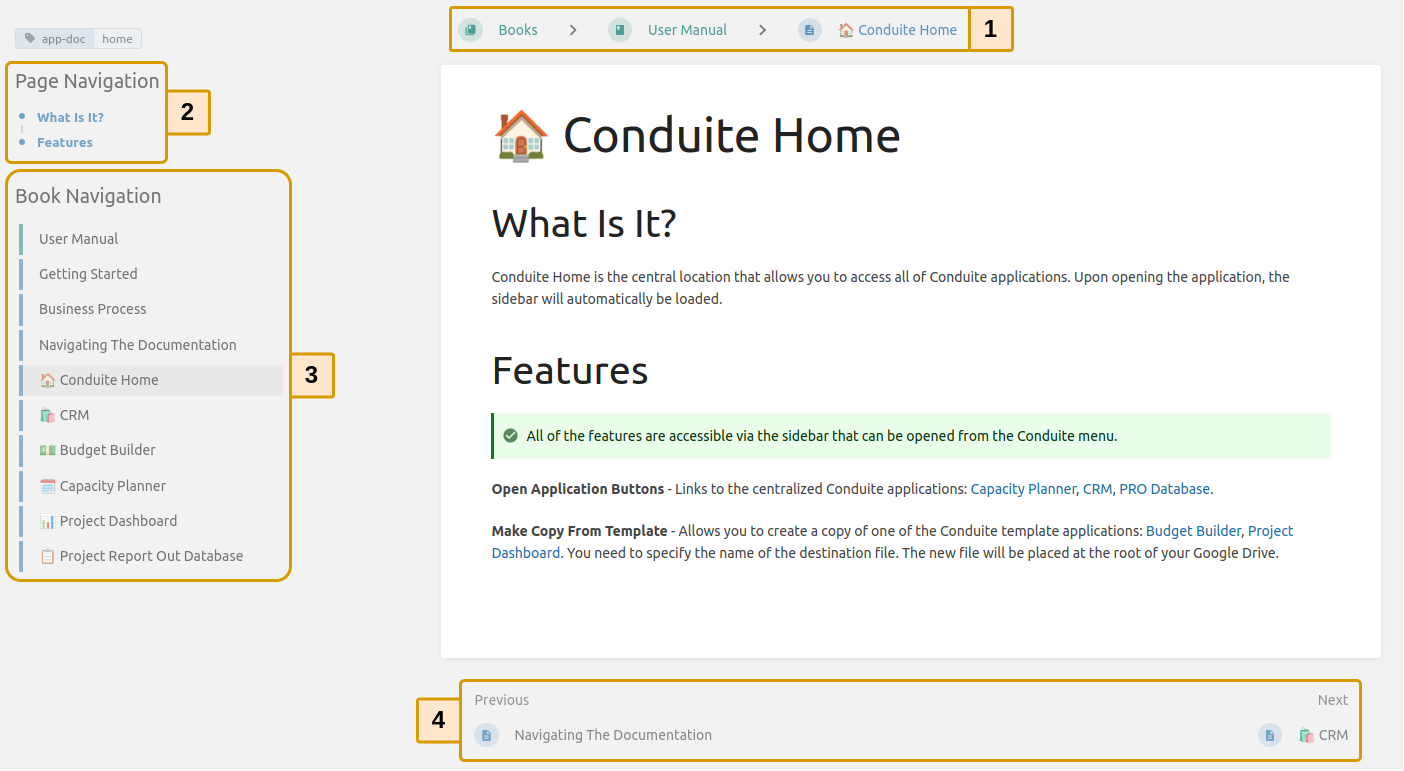
Each documentation page provides several navigation features to help you get around:
1. **Breadcrumb** - Allows you to navigate through the documentation hierarchy.
2. **Page Navigation** - Allows you to quickly jump from one section to another within the page.
3. **Book Navigation** - Allows you to navigate another page within the same book.
4. **Next / Previous Page** - Allows you to navigate to the previous or next page in the book.
## Application Documentation
All documentation pages for Conduite Applications follow the same structure in order to make it easier for you to navigate.
- **What Is It** - A brief description of the application and its purpose.
- **Key Concepts** - The list of key concepts that are needed to use the application. You can expand / collapse blocks individually by clicking on their top bar (see below). The content is pulled from the [Glossary](https://help.conduite.app/books/glossary "Glossary").
- **Key Performance Indicators** - The list of KPIs that the application computes or relies on.
- You can expand / collapse blocks individually by clicking on their top bar (see below). The content is pulled from the [Glossary](https://help.conduite.app/books/glossary "Glossary").
- **Using The Application**
- **Typical Workflow** - The step-by-step description of the typical way users will use the application.
- **Structure & Features** - A comprehensive description of the content of each tab of the application
- **Conduite Addon** - A description of the features provided by the addon for the Conduite application.
Click Me To Expand / Collapse
[](https://help.conduite.app/uploads/images/gallery/2023-04/conduite-logo-256.png)
Well Done! 🎉 There's always helpful information in such collapsible boxes.