# Key Performance Indicators
These KPIs are used throughout Conduite applications. The ones tagged with a ⭐ are considered to be the main KPIs: the ones that are actionable on their own. The other KPIs are intermediate KPIs that are used to compute the main ones. They still provide useful information to understand the the financial situation in more depth.
# Pipeline - Expected Value ⭐
##### Expected Value
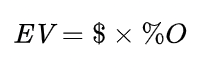
The Expected Value (EV) of an opportunity is the value of the opportunity weighted by the probability of winning the opportunity. It is the key metric allowing you to measure the health of you Business Pipeline.
The EV of an opportunity is expected to evolve over time. If won the EV of an opportunity will be equal to the Total Value of the opportunity (probability equal to 100%).
Where
- EV - Expected Value
- $ - Total Value of the opportunity
- %O - Probability of the opportunity
**Component of EV**
The EV of an opportunity is composed:
- EV Margin - The part of the EV that is margin
- EV Revenue - The part of the EV that is expected to be used to execute the contract if won.
**EV Monthly Average**
The spread of the EV over the duration (in months) of the contract.
# Capacity - Utilization ⭐
The Utilization is the percentage of time worked (or allocated) over the availability. It tells you how busy your team is overall, regardless of the time of work it is doing.
You want to bring Utilization as close to 100% possible.
**Interpretation**
- **High Utilization** means that your team is busy and that you actually know what they are working on since you get it from the data in the [Capacity Planner](https://help.conduite.app/books/user-manual/page/capacity-planner "Capacity Planner").
- **Low Utilization** can mean a few different things:
- That there's simply not enough work planned for your team.
- That the Capacity Planner is not updated with the latest [Resourcing Requests](https://help.conduite.app/books/glossary/page/resourcing-request "Resourcing Request") from the [Sales Team](https://help.conduite.app/books/glossary/page/sales-team "Sales Team") or [Project Managers](https://help.conduite.app/books/glossary/page/project-manager "Project Manager").
- A combination of both.
# Capacity - Billability ⭐
The Billability is proportion of available time your team spends on **billable** **work**. It is a key metric influencing the overall profitability of your organization.
Billable work is defined as an allocation with the Contract Type tag set to *Client* or *Opportunity* in the [Capacity Planner](https://help.conduite.app/books/user-manual/page/capacity-planner "Capacity Planner").
You want to bring Billability as close to 100% possible, although it is expected for your team to spend some amount of time on non-billable tasks (admin, internal projects, etc...).
**Interpretation**
- **High Billability** means that your team is busy working for clients.
- **Low Billability** can mean a few different things:
- That there's simply not enough billable work planned for your team.
- You have planned for too much internal work.
- That the Capacity Planner is not updated with the latest [Resourcing Requests](https://help.conduite.app/books/glossary/page/resourcing-request "Resourcing Request") from the [Sales Team](https://help.conduite.app/books/glossary/page/sales-team "Sales Team") on signed deals or [Project Managers](https://help.conduite.app/books/glossary/page/project-manager "Project Manager").
- A combination of the above.
# Expenses - Invoicing Rate
The Invoicing Rate (IR) corresponds to how much of the expenses a team has invoiced **to date** in relation to what is expected to be invoiced during the entire duration of the project. By keeping track of this metric teams avoid over or under spending on expenses.
# Labor - Execution Budget
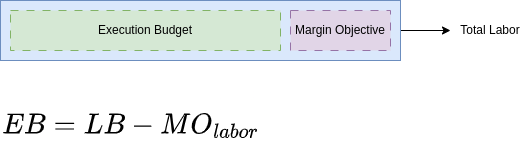
The Execution Budget (EB) is the amount of money for [Labor](https://help.conduite.app/books/glossary/page/labor "Labor") that the project team has to execute the project. It is equal to the total Labor (LB) amount of the contract to which we subtract the [Margin Objective](https://help.conduite.app/books/glossary/page/margin "Margin") (MO) of the labor component.
Because the Margin Objective might change during the course of execution, the Execution Budget can also change. In any case, the project team's objective should always be to spend less or equal than that amount.
# Labor - Expected Execution Budget
The Expected Execution Budget (EB\_E) is the amount of labor that the project team plans to spend to execute a project. It is based on what has been spent to date and the amount it has forecasted to execute the remaining scope.
At the beginning of a project the Expected Execution Budget is equal to the [Execution Budget](https://help.conduite.app/books/glossary/page/labor-execution-budget "Labor - Execution Budget"). But as the project is executed the Expected Execution Budget can, at any given time, be lower or higher than the [Execution Budget](https://help.conduite.app/books/glossary/page/labor-execution-budget "Labor - Execution Budget"):
- **Higher** - The team will spent more money than expected and the [margin](https://help.conduite.app/books/glossary/page/margin "Margin") generated will be lower than the objective.
- **Lower** - The team will spent less money than expected and the margin generated will be above the objective.
# Labor - Execution Rate ⭐
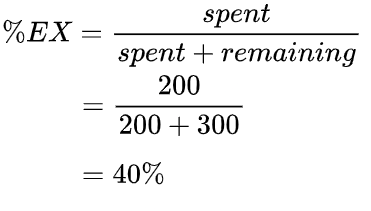
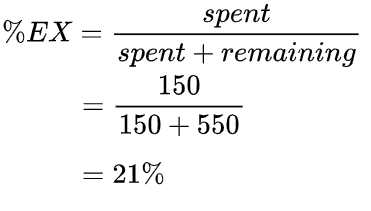
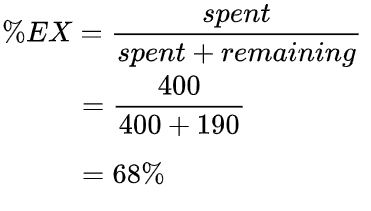
The Execution Rate (%EX) is a financial indicator that tells you how much (%) budget you've spent to date related to the amount you think you need to execute the project, i.e. [Expected Execution Budget](https://help.conduite.app/books/glossary/page/labor-expected-execution-budget "Labor - Expected Execution Budget").
It is not (exactly) an indicator of progress of execution of project activities, i.e. it does not tell us if the project is close to completion. Ex: the last activity of the project is a one week training. This activity represents 30% of the budget but only one week of work.
# Labor - Execution Efficiency ⭐
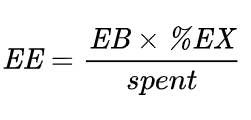
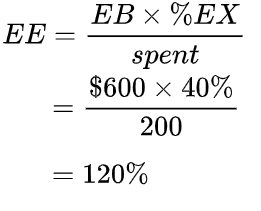
The Execution Efficiency (EE) is a KPI that tells you whether your team is on track to be in budget or not. In other words, whether the team will meet its [Margin Objective](https://help.conduite.app/books/glossary/page/margin "Margin") on labor.
It compares how much labor you would have spent of the Execution Budget (EB) based on your current Execution Rate (%EX) to what you a have spent to date.
Project teams should manage their project to achieve and Execution Efficiency 100% or above.
Because it is a percentage, you can instantly assess the financial health of a project, regardless of the Margin Objective.
It is the main KPI that allows you to trigger adjustments of strategy and/or objectives (client approach, margin, scope, ...).
**Interpretation**
- **EE < 100%** - The team will spent more money than expected and the margin generated will be lower than the objective.
- **EE = 100%** - The team will spent as much as expected.
- **EE > 100%** - The team will spent less money than expected and the margin generated will be above the objective.
**Examples**
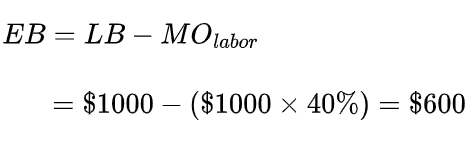
Let's consider a project that has a Labor budget (LB) of $1,000 and a Margin Objective (MO) of 40%. The resulting Execution Budget (EB) is:
Let's consider the following scenarios:
|
| Scenario 1 | Scenario 2 | Scenario 3 |
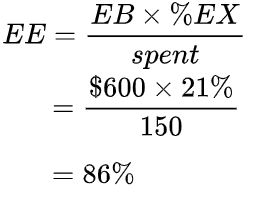
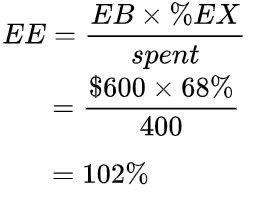
| spent | $200 | $150 | $400 |
| remaining | $300 | $550 | $190 |
| Execution Rate (%EX) |
|
|
|
| Execution Efficiency (EE) |
|
|
|
Let's analyze these numbers and discuss possible actions:
|
| EE | Status | Possible Actions |
| Scenario 1 | 120% | **🎉** | - Increase the Margin Objective
*The team wants to bank the extra margin*
- Invest the additional margin
*The team decides to do more for the client*
|
| Scenario 2 | 86% | **🚨** | - Decrease the Margin Objective
*The team considers it will not be able to make for the lost margin*
- Decrease the scope
*Convince the client to do less work in order to decrease the remaining costs*
- Ask for extra budget
*In order to completely or partially make for the lost margin*
- New working approach
*In order to increase the efficiency of the team and make up all or part of the lost margin*
|
| Scenario 3 | 102% | **👌** | - Nothing
*The team is executing as planned*
|
# Labor - Expected Margin ($/%)
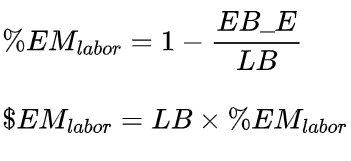
The Expected Margin (%EM) is the computed from the [Expected Execution Budget](https://help.conduite.app/books/glossary/page/labor-expected-execution-budget "Labor - Expected Execution Budget") (EB\_E) and [labor](https://help.conduite.app/books/glossary/page/labor "Labor") (LB) amount of a contract.
It can differ from the [Margin Objective](https://help.conduite.app/books/glossary/page/margin "Margin") (%MO) depending on how the project is going.
**Interpretation**
- **%EM >= %MO** - The team will spent less money than expected. In such situations [Execution Efficiency](https://help.conduite.app/books/glossary/page/labor-execution-efficiency "Labor - Execution Efficiency ⭐") is >= 100%.
- **%EM <= %MO** - The team will spent more money than expected. In such situations Execution Efficiency is <= 100%.
# Labor - Spent
The amount spent on labor **to date**. This data comes from your time tracking system where your team logs hours against projects.
# Labor - Remaining
This is the amount of labor that your team estimates it needs, **at a certain date**, to execute the remaining scope of the project. The ability to accurately estimate the remaining [labor](https://help.conduite.app/books/glossary/page/labor "Labor") is a fundamental determinant of the accuracy of your entire project financial tracking system, i.e [Conduite](https://conduite.app) 😅.